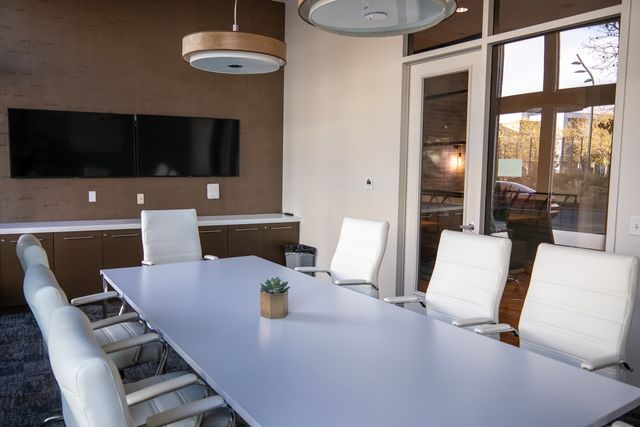
The days of fully in-office or at-home work are over. Today, the modern office worker splits their time between their home workspace and the company office, a hybrid model which has seen the office meeting room become the centre of British companies over the past few years.
It is in this space that both hybrid and in-office colleagues connect, implement ideas, and strategise for success, but if your current meeting room does seem to be up to scratch, then join us as we explore 7 practical ways to bring out its full potential.
Acoustic Wall Panels
When conducting an important meeting between multiple employees, shutting the door simply isn’t going to provide the sound-proofing required.
Fixed walls amplify echoes and reverberate sounds throughout the room, making for a distracting and unproductive brainstorming session. Add in the additional noise of a remote participant through the speakers, and you have an office meeting room that is completely unfit for purpose.
So, before you bring in the conference table, it’s essential that you install sound-absorbing panels around the room to soak up the noise.
HD AV Equipment
Now that the structure of the room is sound(proofed), it’s time to start working on the setup.
In an era of hybrid working, not all meeting participants will be sitting around the table. Instead, they may be joining remotely from their home office, client site, or shared workspace, so make sure that everyone can be heard clearly with integrated speakers installed directly into the walls or ceiling.
Multiple video conference cameras are also recommended to create a more equal setup; one in which online participants employees can see all the in-person ones clearly, not just those nearest to the only camera.
A Presenting Screen
Just like the days of cramped, echoing meeting rooms, the reign of the pull down projector screen is over.
In 2026, it’s all about wireless whiteboards, so help your employees to visualise the plan for a complicated project, or the scale of their recent success, with an interactive board for in-person presentations. Perfect for playing a video, swiping through slides, or allowing remote participants to share their screen, these bright LED boards are a staple for any office meeting space.
Some screens are also touch interactive, meaning that those conducting the meeting can annotate their presentation in real-time based upon the feedback given in the room.
Good Lighting
Natural lighting plays a huge role in combating burnout and safeguarding employee wellbeing. Plenty of sunlight and (ideally) an engaging view all work wonders in a wider office, but within the office meeting room, it’s best to lower the blinds and opt for lighting fixtures instead.
Installing overhead lights directly over the table may seem like the best way to illuminate the meeting space, but we recommend steering clear of them. They create an irritating glare and can also cause unnecessary additional stress for participants during high-stakes meetings, so keep them comfortable with wall-mounted ambient lighting.
Comfortable Office Chairs
Depending on what’s on the agenda for each meeting, your employees may be sat in the same spot for several hours – and, whilst a break for lunch will give them the chance to stretch their legs, ergonomic chairs with back, neck, and wrist support will keep them comfortable during the meeting.
The chairs should also come with plenty of leg room, so don’t cram 15 of them around a table that has only been designed for 10, and make sure that the chairs you opt for come with adjustable neck support to help participants to view the screens without straining.
Modular Seating
Of course, your new office meeting space will be hosting more than just small-scale discussions. It will also be the site of all-hands team meetings, and needs to be equipped with enough comfortable seating for each and every employee.
This is where the space constraints of your office meeting room may be felt the most, but rather than investing in chairs for everyone, opt instead for modular seating that can be reconfigured for each meeting and stored away ahead of the next one.
Freestanding Charging Ports
You’ve successfully designed the perfect office meeting space, but there’s just one issue… the first 10 minutes of every meeting are wasted as employees trail charging cables all over the room in a bid to keep their laptops powered up.
Address this eventuality within the design itself by installing small charging ports atop the table for constant connectivity, without the wires. Why not also have HDMI ports installed so that the relevant participants can plug in and begin presenting without having to manually share their screen or complete a complicated setup?
The Office Meeting Room, Reimagined
Whether you have just one meeting room, or several spread across different floors, the vital role of office meeting rooms in the modern workplace can no longer be overlooked.
If you’re ready to refurbish your office meeting room, then Universal Contracting is the partner for you. Get in touch with them today to talk through your ideas and begin designing an office that puts colleague connectivity first.